

Custom MCP Connections and Tool Discovery
A custom MCP connection makes tools from an MCP server available to StackAI. Tool discovery shows the operations that the server exposes to the connected account.
Before you begin
A supported MCP server URL and its required authentication details.
MCP connection concepts
MCP server
A server that exposes tools and other supported capabilities through Model Context Protocol. Discover the catalog available to the authenticated client.
Transport
The communication mechanism used between an MCP client and server. The client and server must support the same connection method.
Tool discovery
Retrieval of the available tool names, descriptions, and input schemas. Use the current discovered schema instead of guessing an operation name.
Tool argument
A value supplied when calling a tool. It must match that tool’s exposed input schema and refer to accessible resources.
Authentication
Verification of the account or credential making a request. It identifies the caller but does not grant every resource permission.
Connect a custom MCP server
Add the MCP connection using the server’s supported transport and authentication.
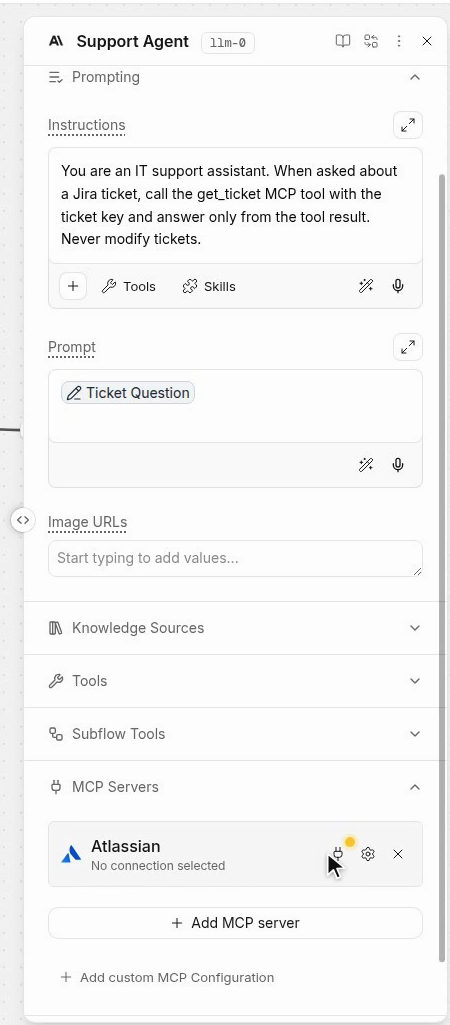
Add the required MCP integration, then review the tools it makes available.
Load its tool catalog and inspect the available descriptions and input schemas.
Select the required tools and run an operation with the expected input fields.

The selected tools are available with the connected account’s permissions.
Behavior and limitations
A successful connection does not guarantee access to every tool or underlying resource. Servers can change their catalogs or restrict tools by account. Refresh discovery after a server change. Treat tool errors separately from connection failures, and follow the server’s documentation for its authentication method.
Related resources
Was this helpful?