

Audit Events and API Key Activity
Audit events record supported administrative and access activity. Use them with run history and API key activity to investigate a change.
Before you begin
Permission to view the relevant audit or API key activity report.
Key concepts
Audit event
A record of a supported administrative or access-related operation. Audit coverage is different from complete workflow execution history.
User identity
The authenticated person or application acting on a resource. It determines access; a display name or conversation ID does not authenticate a caller.
API key
A secret credential accepted by a supported API or connector. Send it only through the documented authentication field or header.
Trace
Details of the steps taken during a run. Use it to locate the first unexpected input, output, or error.
Retention
The period or policy for keeping a category of data. Deleting one resource is not a universal retention rule for all related systems.
Review audit events
Select the time range and available actor or resource filters.
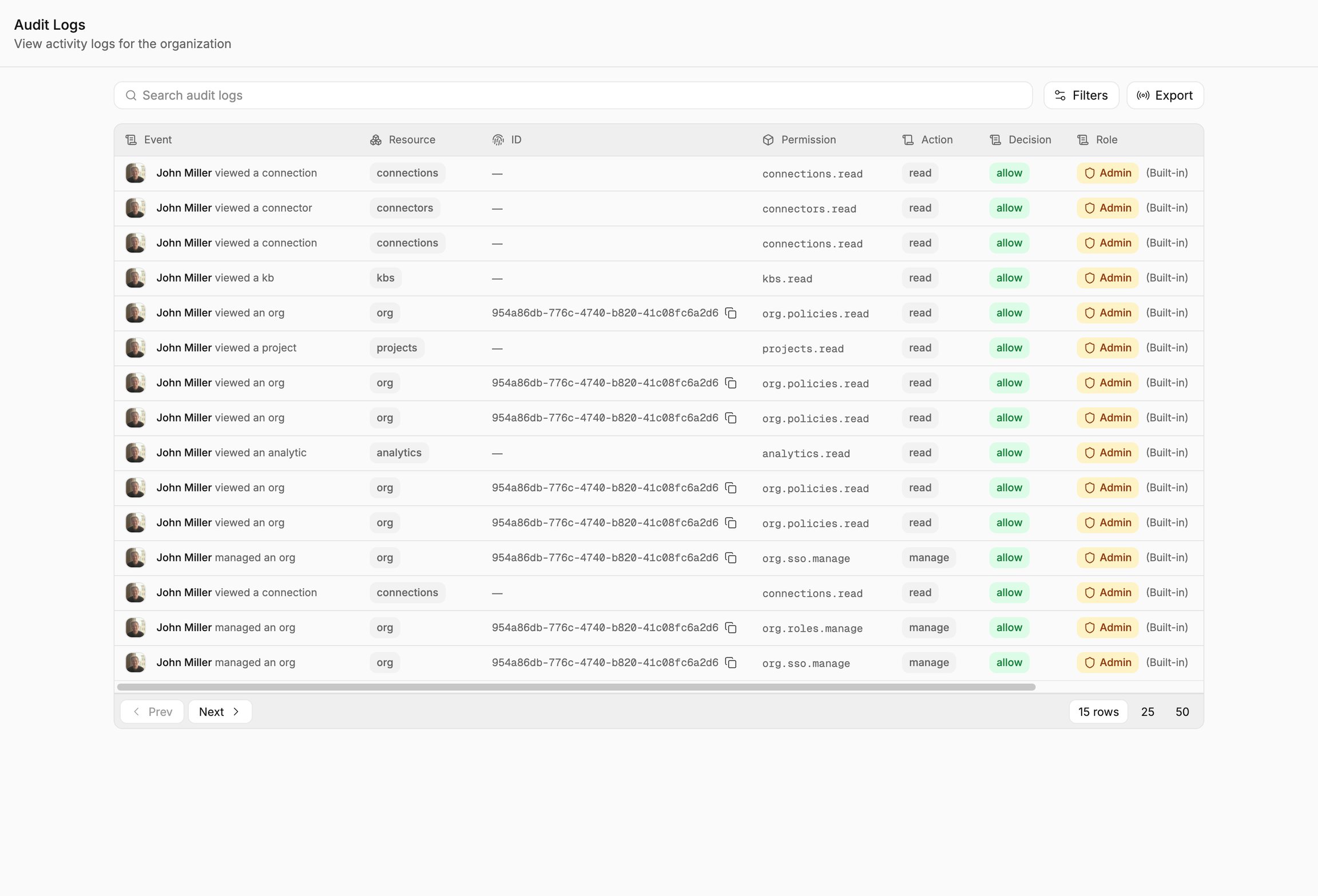
Use the actor, action, resource, and timestamp fields to interpret the event.
Inspect the event’s actor, action, time, and resource.
Compare it with the related run or configuration change and export through the supported control if needed.
You can trace the recorded activity to its relevant account and resource.
Behavior and limitations
Audit coverage is not identical to runtime history. Absence of an audit event does not prove that no operation occurred. Retention and export availability depend on configuration. A key’s activity does not describe every downstream provider operation performed during a run.
Related resources
Was this helpful?