

Branches, Conditions, and Routing
Routing selects the processing path for an input. Use a condition when the rule is explicit. Use AI routing when a model must interpret the request to choose a category.
Before you begin
An editable workflow and clearly defined destination branches.
Key concepts
AI routing
A model-based choice among configured categories or destinations. Use distinct categories and review the selected route for ambiguous requests.
Branch
One possible path after a routing decision. An unselected branch is not automatically a failed branch.
Configuration options
Condition
An explicit comparison or rule used to choose a path.
The compared value and its type must match the intended rule.
Fallback
An alternate response, model, or branch used under a configured failure condition.
A fallback can produce a usable answer while the original operation still failed.
Configure a branch
Define the conditions or categories for each branch.
Map the value the router must inspect. Connect each destination to the appropriate branch.
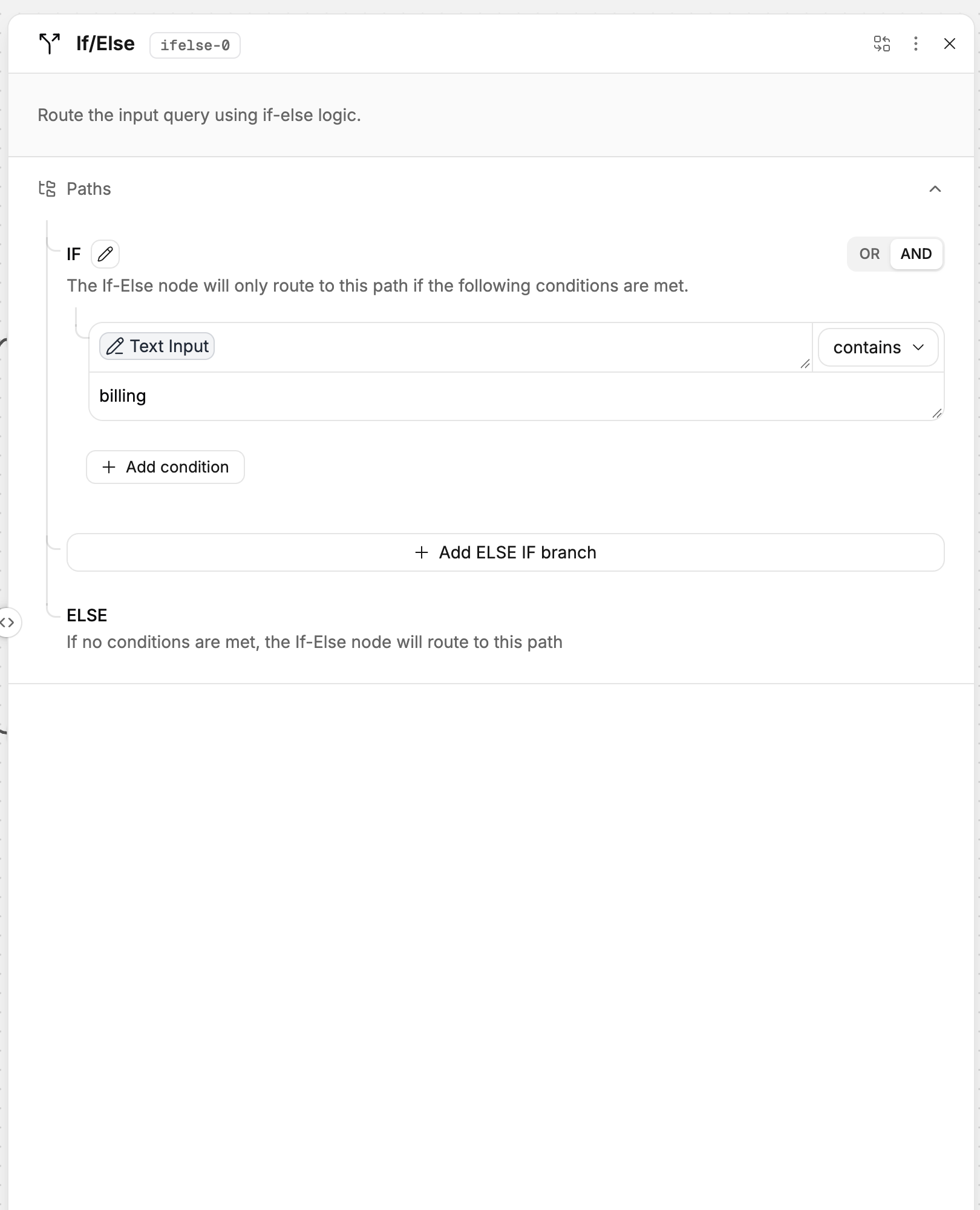
Choose the comparison operator and value for the condition.
Run representative inputs and inspect the selected route and its downstream result.
Only the intended path supplies the result for that decision.
Behavior and limitations
A condition and an AI classification have different failure modes. Check value types for explicit comparisons. Make AI categories distinct and define how unmatched requests should be handled. A branch that was not selected should not be treated as a failed node.
Related resources
Was this helpful?