> For the complete documentation index, see [llms.txt](https://docs.stackai.com/llms.txt). Markdown versions of documentation pages are available by appending `.md` to page URLs; this page is available as [Markdown](https://docs.stackai.com/welcome-to-stackai/security-and-governance/security-in-stackai/system-for-cross-domain-identity-management-scim/scim-through-okta.md).
# SCIM through Okta
This guide walks you through configuring SCIM provisioning between Okta and StackAI. Once set up, user creation, profile updates, deactivations, and role mapping flow automatically from Okta into your StackAI organization.
**Before you start**
* SAML SSO between Okta and StackAI must already be configured (this guide assumes the StackAI SAML app integration already exists in Okta).
* You need admin access in both StackAI and your Okta org.
{% stepper %}
{% step %}
### Select Okta as the identity provider in StackAI
In StackAI, open the **SSO and Provisioning** page (under **Security** in the left sidebar). Under **SCIM Provisioning → Configuration**, set **Identity Provider** to **Okta**.
{% endstep %}
{% step %}
### Open the StackAI app in Okta and edit App Settings
In Okta, go to **Applications → Applications** and open the **StackAI** app (the SAML integration created when you set up SSO). On the **General** tab, click **Edit** next to **App Settings**.
{% endstep %}
{% step %}
### Enable SCIM provisioning and save
In **Provisioning**, select **SCIM**, then save the changes.
{% endstep %}
{% step %}
### Open the new Provisioning tab
After saving, a new **Provisioning** tab appears in the StackAI app. Click it.
{% endstep %}
{% step %}
### Edit the SCIM Connection
In the **Provisioning** tab, under **Settings → Integration**, click **Edit** next to **SCIM Connection**.
{% endstep %}
{% step %}
### Copy the SCIM Base URL from StackAI
Back in StackAI, on the **SSO and Provisioning** page, find **Provisioning Link → SCIM Base URL** and copy the URL.
{% endstep %}
{% step %}
### Paste the SCIM Base URL into Okta and configure the connection
In Okta's SCIM Connection editor, fill in:
* **SCIM connector base URL** — paste the URL you just copied from StackAI.
* **Unique identifier field for users** — `userName`
* **Supported provisioning actions** — check **all** of:
* Import New Users and Profile Updates
* Push New Users
* Push Profile Updates
* Push Groups
* Import Groups
* **Authentication Mode** — `HTTP Header`
{% endstep %}
{% step %}
### Create a SCIM token in StackAI
Back in StackAI, under **SCIM Provisioning → Bearer Tokens**, click **+ Create Token**. Give it a name (e.g. `Okta Token`) and optionally set an expiration date, then click **Create Token**.
{% endstep %}
{% step %}
### Copy the bearer token
Copy the generated token. **It is only shown once** — store it securely.
{% endstep %}
{% step %}
### Paste the token in Okta, test, and save
Back in the Okta SCIM Connection editor, paste the bearer token into the **Authorization** field (next to `Bearer`). Click **Test Connector Configuration** to confirm everything works, then click **Save**.
{% endstep %}
{% step %}
### Edit "Provisioning to App" settings
Still in the **Provisioning** tab, switch to **Settings → To App** in the left rail and click **Edit**.
{% endstep %}
{% step %}
### Enable all provisioning actions
Enable every option:
* Create Users
* Update User Attributes
* Deactivate Users
* Sync Password
Then save.
{% endstep %}
{% step %}
### Add role mappings in StackAI
In StackAI, under **SCIM Provisioning → Role Mappings**, click **+ Add Mapping**. For each mapping, set:
* **IdP Role Value** — the role name exactly as you will write it in Okta (e.g. `Admin`).
* **Organization Role** — the matching StackAI role (e.g. `Admin`).
Repeat for every role you plan to assign through Okta. The IdP Role Value must match exactly what you'll enter in Okta in step 17.
{% endstep %}
{% step %}
### Add a Role attribute to the Okta profile
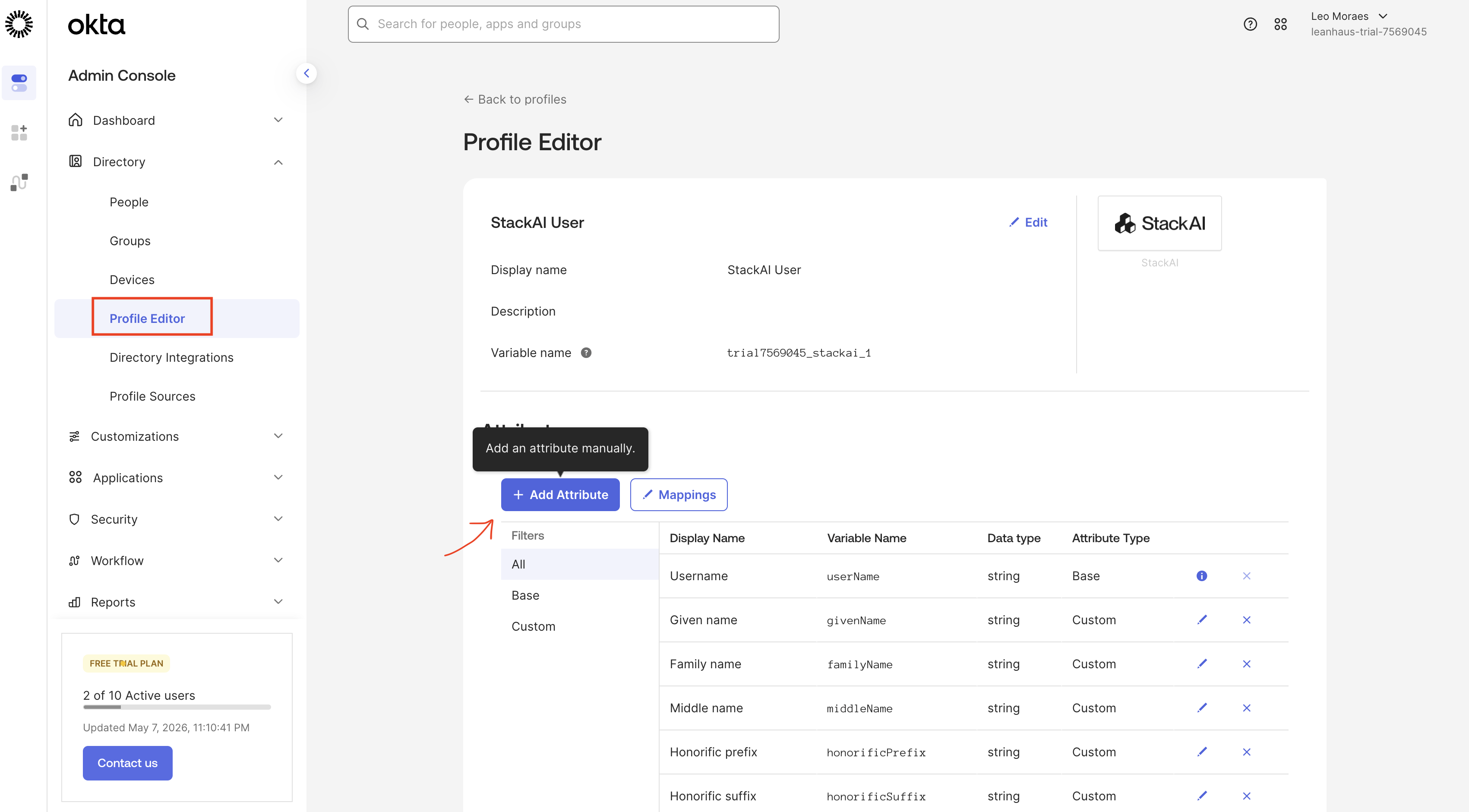
In Okta, go to **Directory → Profile Editor**, open the **StackAI User** profile, and click **+ Add Attribute**.
{% endstep %}
{% step %}
### Configure the Role attribute
Fill the form with these exact values so the role pushed from Okta is mapped correctly to StackAI:
| Field | Value |
| ------------------ | -------------------------------------------- |
| Data type | `string` |
| Display name | `Role` |
| Variable name | `stackaiRole` |
| External name | `roles.^[primary==true].value` |
| External namespace | `urn:ietf:params:scim:schemas:core:2.0:User` |
| Description | *(leave blank)* |
| Enum | *(leave unchecked)* |
| Attribute length | `Between` (leave min/max blank) |
| Attribute required | *(leave unchecked)* |
| Attribute type | `Personal` |
Click **Save**.
{% endstep %}
{% step %}
### Assign people to StackAI from Okta
Go back to **Applications → StackAI** and open the **Assignments** tab. Click **Assign** and choose **Assign to People** (or **Assign to Groups**) to grant access to members of your org.
{% endstep %}
{% step %}
### Set the Role field when assigning a user
When assigning a person, scroll down to the **Role** field and enter the role name **exactly** as you mapped it in StackAI in step 13 (e.g. `Admin`). This is what determines the user's role in StackAI.
{% endstep %}
{% step %}
### Import existing StackAI members into Okta
Open the **Import** tab on the StackAI app in Okta and click **Import Now** to pull existing StackAI users into Okta. Confirm matches as needed.
{% endstep %}
{% endstepper %}
## You're done
SCIM provisioning is now active. From this point on:
* New users assigned to StackAI in Okta are created automatically in StackAI with the role you set.
* Profile and role changes in Okta sync to StackAI.
* Unassigning a user in Okta (or deactivating them) deactivates them in StackAI.
If something doesn't sync as expected, check **View Logs** / **Monitor Imports** at the top of the StackAI app in Okta, and the **Audit Logs** page in StackAI.
---
# Agent Instructions
This documentation is published with GitBook. GitBook is the documentation platform designed so that both humans and AI agents can read, navigate, and reason over technical content effectively. Learn more at gitbook.com.
## Querying This Documentation
If you need additional information that is not directly available in this page, you can query the documentation dynamically by asking a question.
Perform an HTTP GET request on the current page URL with the `ask` query parameter, and the optional `goal` query parameter:
```
GET https://docs.stackai.com/welcome-to-stackai/security-and-governance/security-in-stackai/system-for-cross-domain-identity-management-scim/scim-through-okta.md?ask=&goal=
```
`ask` is the immediate question: it should be specific, self-contained, and written in natural language.
`goal` is optional and describes the broader end goal you are ultimately trying to accomplish on behalf of the user. GitBook uses it to tailor the answer towards what is most useful for that goal.
The response will contain a direct answer to the question and relevant excerpts and sources from the documentation.
Use this mechanism when the answer is not explicitly present in the current page, you need clarification or additional context, or you want to retrieve related documentation sections.