> For the complete documentation index, see [llms.txt](https://docs.stackai.com/llms.txt). Markdown versions of documentation pages are available by appending `.md` to page URLs; this page is available as [Markdown](https://docs.stackai.com/workflow-builder/apps/databricks.md).
# Databricks
Learn how to use the Databricks node in StackAI to run analytics and machine learning queries. See required inputs, configurations, and output examples.
**What is Databricks?**
The Databricks node in StackAI allows you to query a Databricks workspace for data analytics and machine learning. It translates plain English or SQL queries into actionable database operations, returning both the executed SQL and the results.
***
**How to make a Databricks Connection?**
* Login to Databricks, the Workspace URL is illustrated below:
* In this example `dbc-003abf48-15.cloud.databricks.com` is the Workspace URL
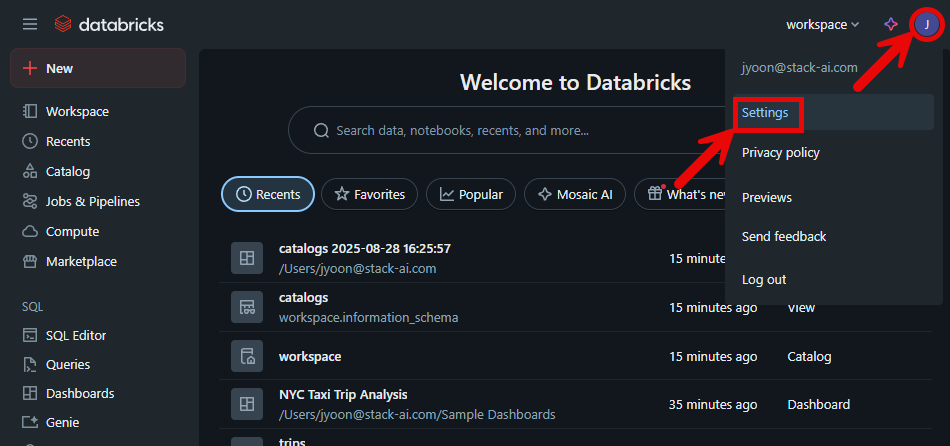
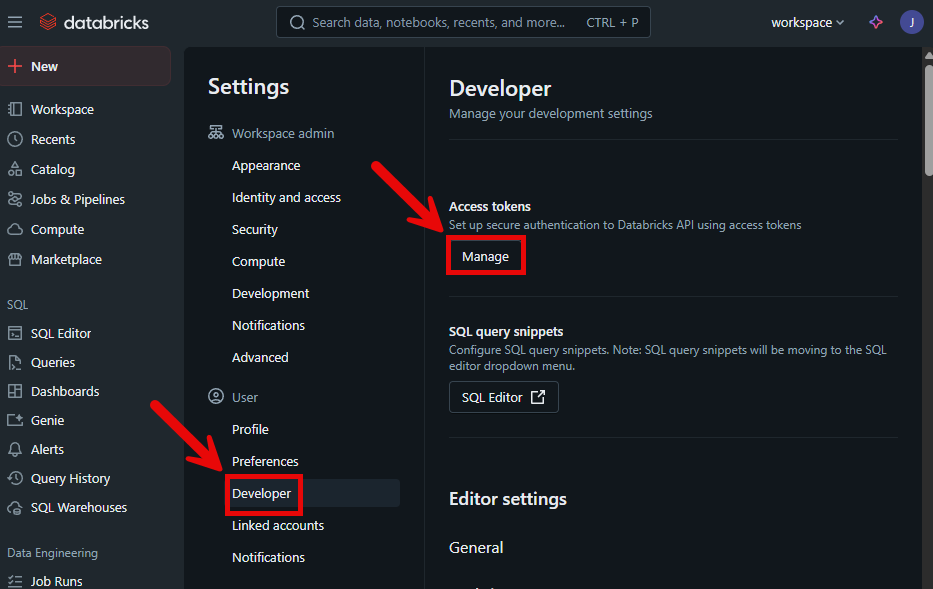
* To get your Personal Access Token:
1. Click on your Profile in the upper right
2. Then click on Settings
* Under Users, click on Developer
* Then in this menu, click on Manage
***
**How to use it?**
1. Add the Databricks node to your StackAI workflow.
2. Provide the required database schema and your query (in plain English or SQL).
3. Connect the node to downstream nodes to process or display the results.
***
**Example of Usage**
Suppose you want to find the total revenue for 2024 from your sales table:
* **Schema Example:**
```
TABLE Sales (OrderID INT, Customer STRING, Revenue DOUBLE, Year INT);
```
* **Query Example:**
```
What is the total revenue for the year 2024?
```
***
**Available Actions**
#### 1. Query a Databricks Workspace
**Description:**\
Run analytics or machine learning queries on your Databricks database using natural language or SQL.
**Inputs**
* **Schema (sql\_schema)**
* **Type:** Array of strings (textarea)
* **Required:** Yes
* **Description:** The database schema, including tables, columns, and types.
* **Example:**
```
TABLE Sales (OrderID INT, Customer STRING, Revenue DOUBLE, Year INT);
```
* **Query (query)**
* **Type:** String
* **Required:** Yes
* **Description:** The question or command you want to run, in plain English or SQL.
* **Example:**
```
What is the total revenue for the year 2024?
```
**Configurations**
* No additional configurations are required for this action.
**Outputs**
* **Query (sql\_query)**
* **Type:** String
* **Required:** Yes
* **Description:** The SQL query that was executed.
* **Example:**
```
SELECT SUM(Revenue) FROM Sales WHERE Year = 2024;
```
* **Results (results)**
* **Type:** Array of objects
* **Required:** Yes
* **Description:** The results returned from the Databricks query.
* **Example:**
```
[
{ "SUM(Revenue)": 1250000 }
]
```
***
**Summary Table**
| Field | Type | Required | Description | Example |
| ----------- | ---------------- | -------- | ---------------------------------------------- | ------------------------------------------ |
| sql\_schema | Array of strings | Yes | Database schema (tables, columns, types, etc.) | TABLE Sales (OrderID INT, Revenue DOUBLE); |
| query | String | Yes | Query in plain English or SQL | What is the total revenue for 2024? |
| sql\_query | String | Yes | The SQL query that was executed | SELECT SUM(Revenue) FROM Sales WHERE ... |
| results | Array of objects | Yes | Results of the Databricks query | \[{ "SUM(Revenue)": 1250000 }] |
***
**Best Practices**
* Always provide a clear and complete schema for accurate query translation.
* Use natural language for ease, or SQL for precision.
* Review the returned SQL to ensure it matches your intent.
***
Use the Databricks node in StackAI to seamlessly integrate advanced analytics and machine learning queries into your automated workflows.
---
# Agent Instructions
This documentation is published with GitBook. GitBook is the documentation platform designed so that both humans and AI agents can read, navigate, and reason over technical content effectively. Learn more at gitbook.com.
## Querying This Documentation
If you need additional information that is not directly available in this page, you can query the documentation dynamically by asking a question.
Perform an HTTP GET request on the current page URL with the `ask` query parameter, and the optional `goal` query parameter:
```
GET https://docs.stackai.com/workflow-builder/apps/databricks.md?ask=&goal=
```
`ask` is the immediate question: it should be specific, self-contained, and written in natural language.
`goal` is optional and describes the broader end goal you are ultimately trying to accomplish on behalf of the user. GitBook uses it to tailor the answer towards what is most useful for that goal.
The response will contain a direct answer to the question and relevant excerpts and sources from the documentation.
Use this mechanism when the answer is not explicitly present in the current page, you need clarification or additional context, or you want to retrieve related documentation sections.