> For the complete documentation index, see [llms.txt](https://docs.stackai.com/llms.txt). Markdown versions of documentation pages are available by appending `.md` to page URLs; this page is available as [Markdown](https://docs.stackai.com/workflow-builder/inputs/image-input-node.md).
# Image Input Node
The Image Input node allows you to analyze and process images using advanced AI vision models. It can describe image content, extract information, answer questions about images, and perform various computer vision tasks by processing images from uploaded files.
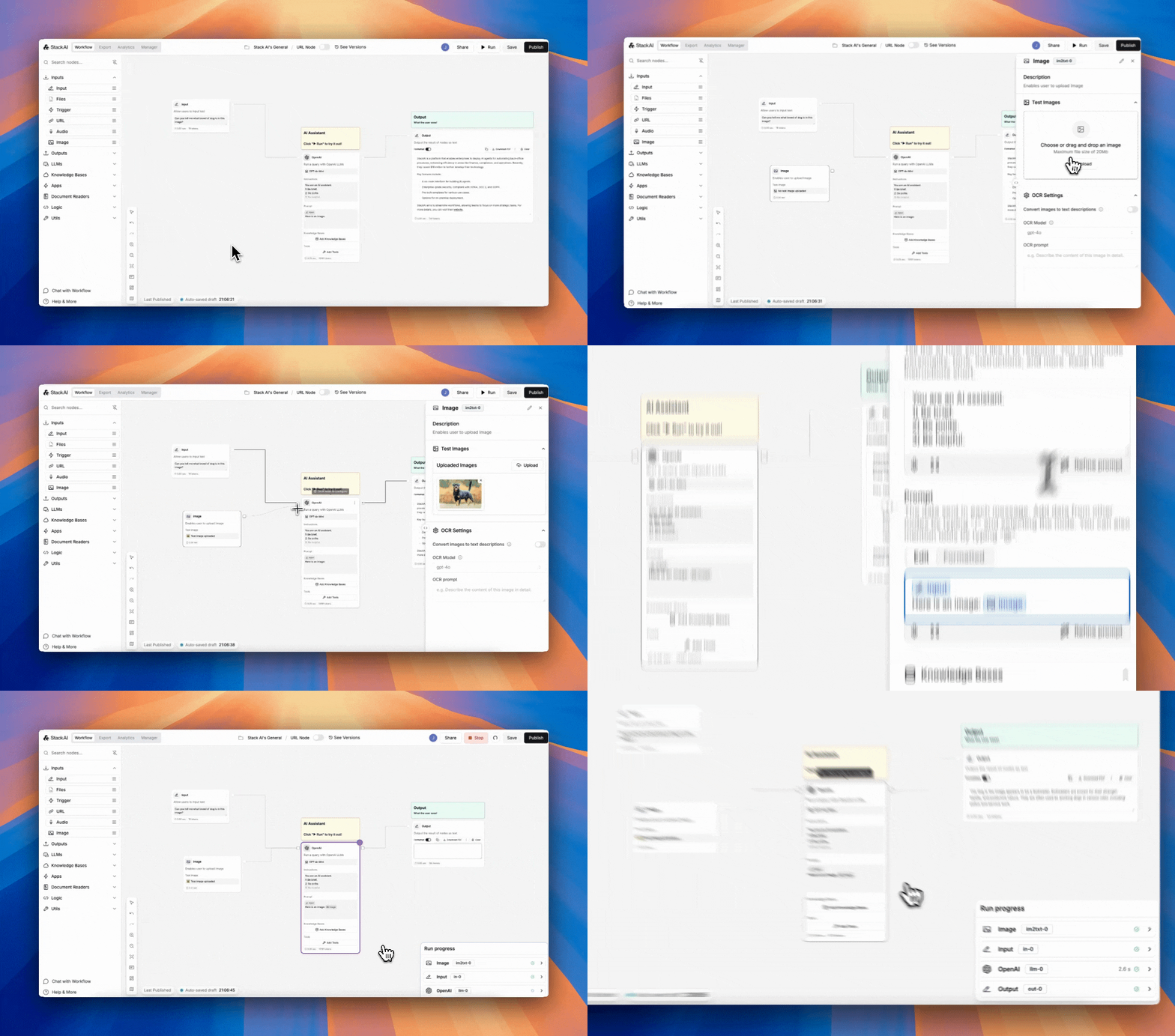
To use the image node, upload a file or multiple files and connect the node to your input.
### OCR
OCR is OFF by default. Turn it ON to first transform the image to text before passing to the model. A model of your choice will transform the image to text, based on a prompt you provide.
**Available Models**
Select the AI vision model to use for image analysis
* **gpt-4o**: Fastest option
* **gpt-4.1**: Balanced option offering good performance with faster processing
* **flux-kontext-pro:** Advanced model for detailed image understanding and complex analysis
**OCR prompt**: Describe what you want the AI to do with the image
* Be specific about what information you need extracted
* Examples: "Describe the content of this image in detail", "Count the number of people in this photo", "What text is visible in this image?"
### Outputs
The Image Input node provides processed information based on your prompt and the selected model's analysis of the image.
### Common Use Cases
* **Content Moderation**: Automatically detect inappropriate or unsafe content in images
* **Product Cataloging**: Extract product details, descriptions, and features from product photos
* **Document Processing**: Extract text and data from scanned documents, receipts, or forms
* **Quality Control**: Analyze product images for defects or compliance issues
* **Social Media Management**: Generate captions and descriptions for social media posts
* **Accessibility**: Create alt text descriptions for web images
* **Inventory Management**: Count items or identify products in warehouse photos
* **Medical Imaging**: Analyze medical images for preliminary screening (with appropriate oversight)
* **Real Estate**: Generate property descriptions from listing photos
* **Education**: Create study materials by analyzing diagrams, charts, or textbook images
### Prompt Examples
* **General Description**: "Describe everything you see in this image in detail"
* **Text Extraction**: "Extract all visible text from this image and format it as plain text"
* **Object Counting**: "Count how many \[specific objects] are visible in this image"
* **Color Analysis**: "What are the dominant colors in this image?"
* **Scene Understanding**: "What is the setting or location shown in this image?"
* **Safety Assessment**: "Identify any potential safety hazards visible in this workplace image"
* **Product Information**: "List all the product features and specifications visible on this packaging"
### Best Practices
* **Image Quality**: Use high-resolution, clear images for better analysis results
* **Specific Prompts**: Be precise about what information you need from the image
* **Model Selection**: Choose the appropriate model based on complexity requirements
* **URL Accessibility**: Ensure image URLs are publicly accessible and don't require authentication
* **File Formats**: Use standard image formats (JPG, PNG) for best compatibility
* **Privacy Considerations**: Be mindful of privacy when processing images containing personal information
### Troubleshooting
* **Image Not Loading**: Verify the image URL is correct and publicly accessible
* **Poor Analysis Results**: Try using a more detailed or specific prompt
* **Model Errors**: Switch to a different model if you encounter processing issues
* **Slow Processing**: Consider using o3-mini for faster results on simple tasks
* **Format Issues**: Ensure your image is in a supported format and not corrupted
---
# Agent Instructions
This documentation is published with GitBook. GitBook is the documentation platform designed so that both humans and AI agents can read, navigate, and reason over technical content effectively. Learn more at gitbook.com.
## Querying This Documentation
If you need additional information that is not directly available in this page, you can query the documentation dynamically by asking a question.
Perform an HTTP GET request on the current page URL with the `ask` query parameter, and the optional `goal` query parameter:
```
GET https://docs.stackai.com/workflow-builder/inputs/image-input-node.md?ask=&goal=
```
`ask` is the immediate question: it should be specific, self-contained, and written in natural language.
`goal` is optional and describes the broader end goal you are ultimately trying to accomplish on behalf of the user. GitBook uses it to tailor the answer towards what is most useful for that goal.
The response will contain a direct answer to the question and relevant excerpts and sources from the documentation.
Use this mechanism when the answer is not explicitly present in the current page, you need clarification or additional context, or you want to retrieve related documentation sections.